Tutorial #4: File Reading and Antiferromagnets
Aims:
Set up a structure using input files rather than by hand
Work with antiferromagnetic structures
Extract raw bandstructure data
In this example, we’ll use an iron-gadolinium toy model:
Initialize
import magnon
Structure Inputs
Magnon makes good use of ASE, and this includes its I/O capabilities. The unit cell structure
can be read directly into an Atoms object using e.g. ase.io.read() with any of the standard structure file formats allowed by that function.
In this example, we read from a POSCAR file FeGd.poscar:
FeGd
1
        1.0000000000         0.0000000000         0.0000000000
        0.0000000000         1.0000000000         0.0000000000
        0.0000000000         0.0000000000         1.0000000000
   Fe       Gd
    1        1
Direct
     0.000000000         0.000000000         0.000000000
     0.500000000         0.500000000         0.500000000
atoms = ase.io.read("FeGd.poscar")
Since not all of these file formats will allow the inclusion of magnetic moment information, and to allow flexibility in
the set-up of these quantities, the magnetic moments may be read in from a separate file using magnon.input.read_site_spin_data,
which takes a file containing the magnitudes and directions of the magnetic moments, FeGd_moments,
# magmom sx sy sz
  3.0     0  0  1
  7.0     0  0 -1
magmoms, directions = magnon.input.read_site_spin_data("FeGd_moments")
atoms.set_initial_magnetic_moments(magmoms[:, np.newaxis] * directions)
The spin quantum number or magnetic moment may be specified by changing the magmom_scaling factor. To specify magnetic moments in the input file, the scaling should be \(1\). When specifying spin quantum numbers, it should be \(2\).
Exchange coupling inputs
The exchange coupling may be imported from a file FeGd_exchange with the format,
# i j  vector        J
  1 1  1.0 0.0 0.0  18
  2 2  1.0 0.0 0.0   5
  1 2  0.5 0.5 0.5  -2
This format matches that returned by many codes used to compute exchange couplings. This is read in the form required to initialise an InteractionList via
magnon.interactions.read_interactions:
interactions = magnon.interactions.read_interactions("FeGd_exchange")
interactions = magnon.interactions.InteractionList(interactions, atoms=atoms)
Note
Magnon also supports tensor coupling for more complicated spin interactions. These are specified by nine entries after the vector, rather than the single entry for a scalar (isotropic) interaction.
Reading in a single line
All of the above can be achieved more compactly using
atoms, interactions = magnon.input.create_interacting_system('FeGd.poscar', 'FeGd_moments', 'FeGd_exchange',)
Getting the bandstructure
The rest of the process proceeds along the lines we have already seen in previous tutorials; here we manually set the high-symmetry points as we did in the very first tutorial:
interactions = interactions.symmetrize(atoms)

special = {
    'G': [0,0,0],
    'H': [0.5,-0.5,0.5],
    'N': [0,0,0.5],
    'P': [0.25,0.25,0.25],
}

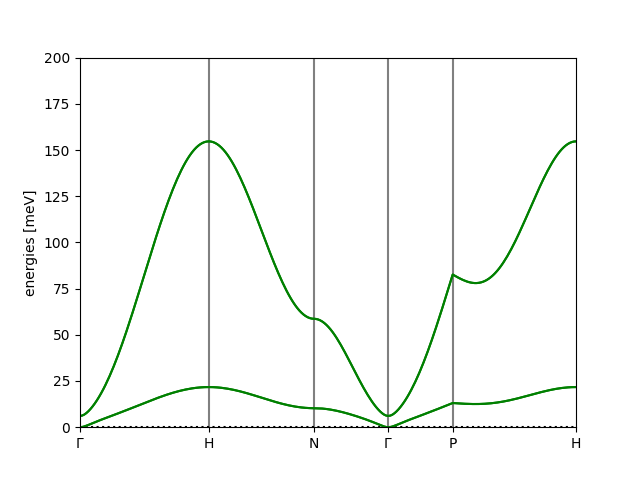
path = atoms.get_cell().bandpath(path='GHNGPH', npoints=240, special_points=special)

spectrum = magnon.MagnonSpectrum(atoms, interactions, ham_prefactor=1)

bstruct = spectrum.get_band_structure(path)
bstruct.plot(emin=0, emax=200, filename='FeGd_bands.png')
yielding
Extracting the bandstructure data
We can extract the reciprocal space path points and corresponding band energies from the BandStructure object as:
k_points = bstruct.path.cartesian_kpts()
bands = bstruct.energies
and we can write the bandstructure to a JSON file using:
bstruct.write("FeGd_bands.json")
which allows you to use the raw data to generate your own plots or analyses.
Full script
import magnon

atoms, interactions = magnon.input.create_interacting_system('FeGd.poscar', 'FeGd_moments', 'FeGd_exchange',)
interactions = interactions.symmetrize(atoms)

special = {
    'G': [0,0,0],
    'H': [0.5,-0.5,0.5],
    'N': [0,0,0.5],
    'P': [0.25,0.25,0.25],
}

path = atoms.get_cell().bandpath(path='GHNGPH', npoints=240, special_points=special)

spectrum = magnon.MagnonSpectrum(atoms, interactions, ham_prefactor=1)

bstruct = spectrum.get_band_structure(path)
bstruct.plot(emin=0, emax=200, filename='FeGd_bands.png')

k_points = bstruct.path.cartesian_kpts()
bands = bstruct.energies

print(k_points[0], bands[0][0])

bstruct.write("FeGd_bands.json")